
Original publication
Published 2012-05-02 · atrice. The article below retains the original wording. Product offers, download links and technical advice describe the publication date.
I've been "out and about" lately, attending tech conferences, meetup groups, and meeting with developers in their offices, and I am getting great feedback on mobile development and PhoneGap. There are some common questions that I am often asked, and I hope this post helps everyone understand PhoneGap better.
PhoneGap
Before I go too far, let me attempt to clearly state what PhoneGap is... PhoneGap is an application container technology that allows you to create natively-installed applications for mobile devices using HTML, CSS, and JavaScript. The core engine for PhoneGap is also 100% open source, under the Apache Cordova project.
PhoneGap User Interface
The user interface for PhoneGap applications is created using HTML, CSS, and JavaScript. The UI layer of a PhoneGap application is a web browser view that takes up 100% of the device width and 100% of the device height.
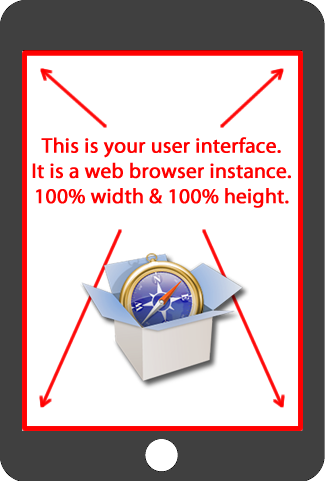
Think of this as a "chrome-less" web browser. It renders HTML content, without the "chrome" or window decoration of a regular web browser. You build your application to take advantage of this space, and you build navigational/interactive/content elements and application chrome into your HTML and CSS based user interface.
The web view used by PhoneGap is the same web view used by the native operating system. On iOS, this is the Objective-C UIWebView class; on Android, this is android.webkit.WebView. Since there are differences in the web view rendering engines between operating systems, make sure that you account for this in your UI implementation.
PhoneGap API
PhoneGap provides an application programming interface (API) that enables you to access native operating system functionality using JavaScript. You build your application logic using JavaScript, and the PhoneGap API handles communication with the native operating system.
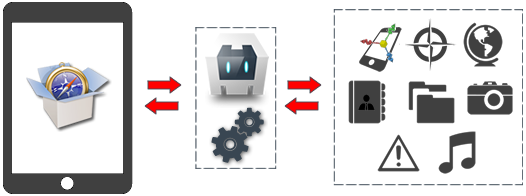
You can read about the PhoneGap API and all of the native functionality it exposes at docs.phonegap.com.
In addition to the "out of the box" functionality, you can also leverage PhoneGap's JavaScript-to-native communication mechanism to write "native plugins". PhoneGap native plugins enable you to write your own custom native classes and corresponding JavaScript interfaces for use within your PhoneGap applications. You can read more about PhoneGap native plugins at: http://www.tricedesigns.com/2012/03/01/phonegap-native-plugins/and http://wiki.phonegap.com/w/page/36752779/PhoneGap%20Plugins
PhoneGap Application Packaging and Distribution
PhoneGap applications are developed using HTML, CSS, and JavaScript, however the final product of a PhoneGap application is a binary application archive that can be distributed through standard application ecosystems.
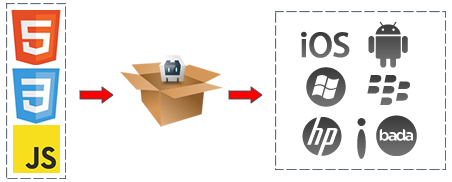
For iOS applications the output is an IPA file) (iOS Application Archive), for Android applications the output is an APK file) (Android Package), for Window Phone the output is a XAP file (Application Package), etc... These are the same application packaging formats used by "native" applications, and can be distributed through the appropriate ecosystems (iTunes Store, Android Market, Amazon Market, BlackBerry App World, Windows Phone Marketplace, etc...)
PhoneGap High-Level Application Architecture
Specific application architectures are going to differ on a case-by-case basis, however most data-driven applications employ the following basic architecture. The PhoneGap application acts as a client for the user to interact with. The PhoneGap client communicates with an application server to receive data. The application server handles business logic and communicates with a back-end data repository.
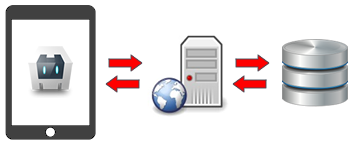
The application server is normally a web server (Apache, IIS, etc...) and has a server side scripting language such as ColdFusion, Java, .NET, PHP, etc... PhoneGap is agnostic of back-end technologies and can work with any application server using standard web protocols. The application server performs business logic and calculations, and generally retrieves or persists data from a separate data repository - this is normally a relational database, but could be any structure or mechanism for data persistence.
PhoneGap applications generally do not talk directly to a database; communication is routed through an application server. The client to application server communication can be based upon standard HTTP requests for HTML content, REST-ful XML services, JSON services, or SOAP (or websockets if your OS supports it). These are the exact same techniques that you would use in a desktop-browser based AJAX) application.
The client-side architecture generally uses the single-page application model, where the application logic is inside a single HTML page. This page is never unloaded from memory. All data will be displayed by updating the HTML DOM, data is retrieved from the application server using AJAX techniques, and variables are kept in-memory within JavaScript.
Multi-page client-side application architectures are supported, but are not recommended because you lose in-memory variables when loading a separate page.
 Andrew Trice is a Technical Evangelist with Adobe Systems. Andrew brings to the table over a decade of experience designing, implementing, and delivering rich applications for the web, desktop, and mobile devices. Andrew is an experienced architect, team leader, accomplished speaker, and published author, specializing in immersive experiences, mobile development, realtime data systems, and data visualization. Andrew regularly writes at tricedesigns.com, or you can follow him on twitter @andytrice.
Sources & archive notes
Recovered repository material is attributed to its original authors and distributed with its source license. Changes: FreeSoft layout, archive context, navigation, link and image locations. Apache License 2.0 · Notices and provenance. Editorial material is labeled separately.