Hopter Ping Monitor is a small and useful program for monitoring communication with a specified computer on a local network or the Internet.
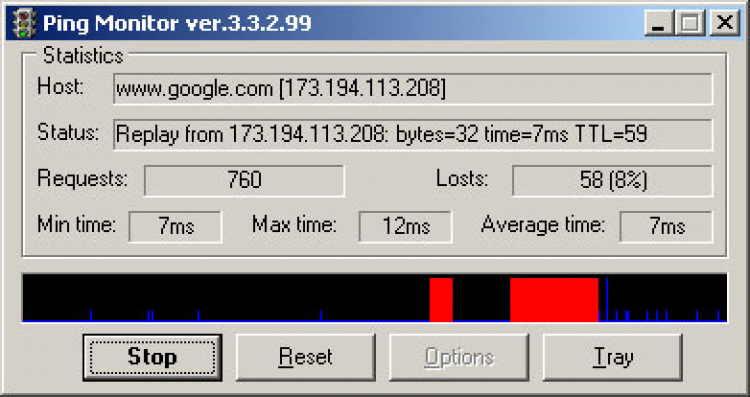
The control consists in periodically pinging the specified computer. Ping results are displayed in the statistics window:
The results of the ping are also displayed on the graph, where blue color represents successful requests, and red - lost ones.
In addition, the program analyzes the success of the requests, and based on this analysis selects one of three statuses for the monitored computer:
You can analyze the quality of connection by the number of identical consecutive query results (By tries), by the percentage of successful and unsuccessful queries (By Percent of loses), and by average computer response time (By average time (ms)).
The status is displayed on the program icon. You can specify in the settings which sound file should be played and which application should be started when the light turns red or green. By the way, when switching from the yellow light, the files will not be played, as well as the specified application will not be started.
The monitor can be minimized to an icon in the information panel near the clock (tray).
To rate Hopter Ping Monitor you need to register or log in on our website
All files provided on this site are original, we do not repackage or modify the files.

 Русский
 Français



 Download